Interactive Map of Japan Overview
Command data representation across high-density East Asian economic hubs using a vector-based Japanese map plugin. Japan boasts an advanced infrastructure anchoring multiple massive metropolitan grids spanning from Hokkaido to Kyushu. This responsive framework isolates the country’s 47 administrative prefectures, enabling corporate enterprises, e-commerce networks, and local media sites to visually separate regional sales territories or retail franchises with absolute ease.
Main Features
Everything included with the Interactive Map of Japan plugin.
Map Capabilities
Every Prefecture, Individually Clickable
All 47 prefectures, each its own clickable region — not one flat image.
Visual Editor, No Code
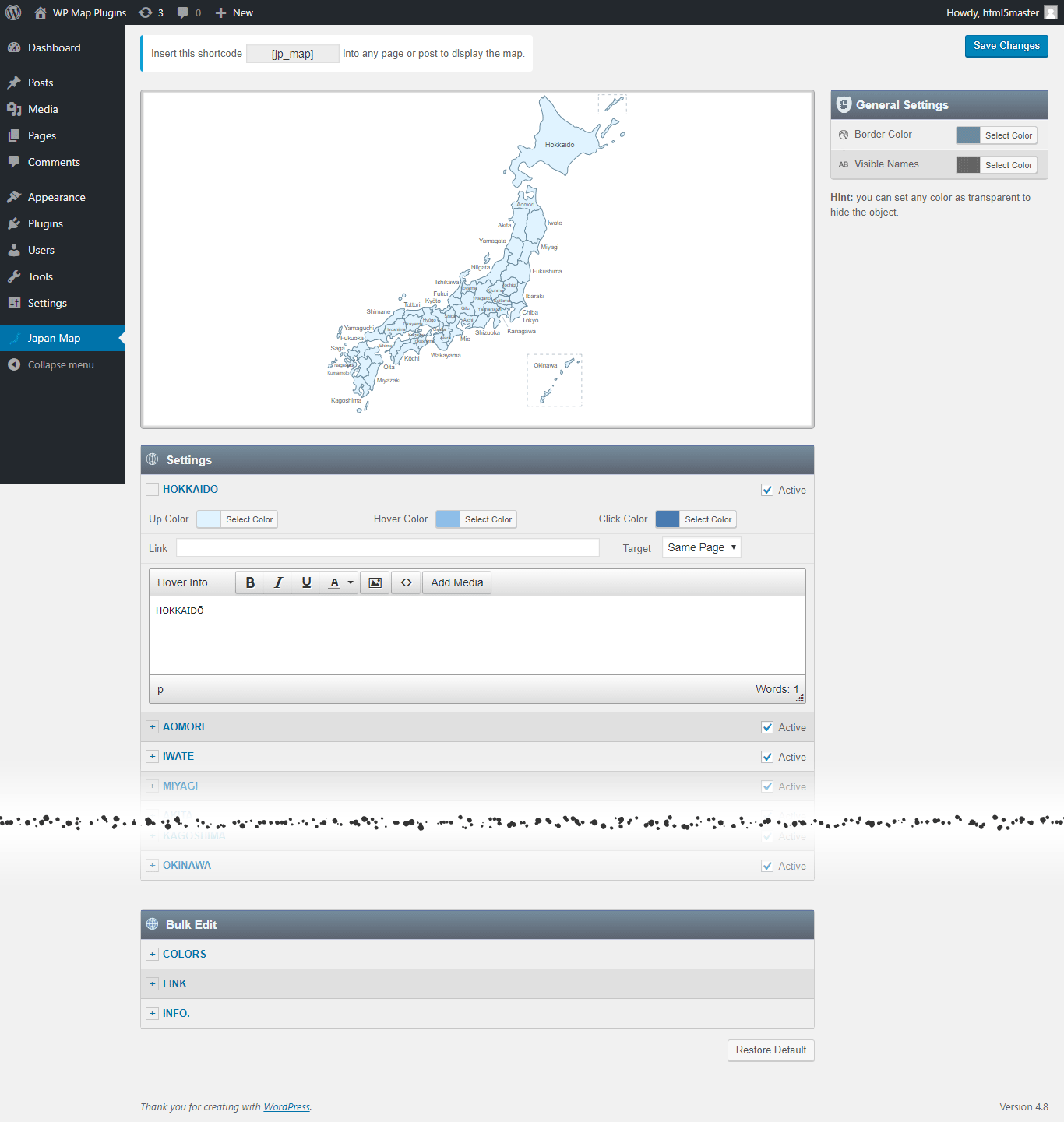
Set a color, a link, and a hover popup for any region directly in the WordPress editor.
SVG — Always Sharp
Vector graphics, so the map stays crisp on everything from a phone to a 4K monitor.
No iframe, No External API
The map loads with your page — no embed, no third-party map service, no API key to manage.
Custom Hover Popups
Add text, images to the hover Popup. And link each region to any URL.
One Shortcode to Install
Drop a single shortcode into any post, page, or widget area — no theme editing required.
Multiple Maps, One Site
Build up to 3 instances of the map on your site, each with its own colors, links, and popups.
Popup Maker Integration
New Trigger a full Popup Maker popup from any region click for more advanced layouts.
Watch a Video →Why Get It From Us
No Trial, No Expiration
This is the free version of the plugin, ready to use on your site — not a time-limited trial.
Free Lifetime Updates
Every future update to this plugin is included at no extra cost.
Support From the Developer
Questions go directly to the person who built the plugin, not a ticket queue.
Common Ways Businesses Use This Map
See examples of how businesses use the Interactive Map of Japan plugin.
High-Tech, Robotics, and Automotive Supply Chains
Plotting major hardware manufacturing plants, electronic component suppliers, and advanced engineering R&D hubs.
National Retail and Bullet-Train Logistics Networks
Directing online shoppers to localized distributor databases, flagship retail outlets, or delivery coverage corridors.
Four-Season Mountain and Coastal Tourism Guides
Organizing regional vacation packages, bullet-train itineraries, ski resort operations, and hot spring resort bookings.
List of the clickable prefectures in the map of Japan
Each prefecture can be customized independently (colors, link, hover information, etc).
- Hokkaidō [北海道]
- Aomori [青森県]
- Iwate [岩手県]
- Miyagi [宮城県]
- Akita [秋田県]
- Yamagata [山形県]
- Fukushima [福島県]
- Ibaraki [茨城県]
- Tochigi [栃木県]
- Gunma [群馬県]
- Saitama [埼玉県]
- Chiba [千葉県]
- Tōkyō [東京都]
- Kanagawa [神奈川県]
- Niigata [新潟県]
- Toyama [富山県]
- Ishikawa [石川県]
- Fukui [福井県]
- Yamanashi [山梨県]
- Nagano [長野県]
- Gifu [岐阜県]
- Shizuoka [静岡県]
- Aichi [愛知県]
- Mie [三重県]
- Shiga [滋賀県]
- Kyōto [京都府]
- Ōsaka [大阪府]
- Hyōgo [兵庫県]
- Nara [奈良県]
- Wakayama [和歌山県]
- Tottori [鳥取県]
- Shimane [島根県]
- Okayama [岡山県]
- Hiroshima [広島県]
- Yamaguchi [山口県]
- Tokushima [徳島県]
- Kagawa [香川県]
- Ehime [愛媛県]
- Kōchi [高知県]
- Fukuoka [福岡県]
- Saga [佐賀県]
- Nagasaki [長崎県]
- Kumamoto [熊本県]
- Ōita [大分県]
- Miyazaki [宮崎県]
- Kagoshima [鹿児島県]
- Okinawa [沖縄県]
Frequently Asked Questions
Find answers to common questions about the Interactive Map of Japan WordPress Plugin.
Can I add an image in the hover popup?
Yes. You can add text and images to the hover popup. However, we recommend keeping the hover popup content concise and using the modal window option for more detailed content.
Can I add clickable links in the hover popup?
You can link each clickable area to any URL, but the hover popup itself does not support clickable links. If you need more detailed content with clickable links, you can use the modal window option together with the Popup Maker plugin. This allows you to open a modal window containing as much text, clickable links, and images as needed. Watch a Video →
Can I create another map with different style in my website?
Yes. The full version includes 3 installable instances of the plugin, allowing you to create a second and third map with different colors, links, and other settings. Each map has its own dedicated shortcode.
Do you offer special customization if needed?
Yes. We offer custom development and customization services, including:
- Merging or splitting regions.
- Creating a completely new map from scratch.
- Adding or removing regions.
- Adding custom legend, or other map elements.