Table of Contents
- What Actually Happens When a Google Maps Embed Loads
- Why That's a GDPR/ePrivacy Issue, Not Just a Privacy Nicety
- The Common Fixes Site Owners Try — and Where They Fall Short
- How a Self-Hosted SVG Map Removes the Problem at the Source
- What "Compliant by Design" Looks Like in Practice
- A Quick Self-Audit for EU Site Owners
- Conclusion
1. What Actually Happens When a Google Maps Embed Loads

Most site owners assume a map is just a digital image, but technically, it is a window into Google's servers. Whether you use the simple iframe embed or the Maps JavaScript API, the moment your page loads—before a user even hovers over the map—your site initiates a connection to Google’s servers.
During this handshake, Google may place tracking cookies (often labeled NID or SID) on your visitor's device and collect data points like their IP address and browser fingerprint. This data transfer happens immediately, meaning the tracking event has already occurred by the time the user sees the map.
2. Why That's a GDPR/ePrivacy Issue, Not Just a Privacy Nicety

This "load first, ask later" behavior directly conflicts with EU privacy laws.
- ePrivacy Directive (The "Cookie Law"): This requires prior, informed consent for any non-essential tracker. Since a Google Map is not strictly essential for the technical functioning of a website (unlike a shopping cart session cookie), loading it without permission is a violation.
- GDPR and Schrems II: The issue goes deeper than cookies. Because Google is a US-based company, embedding their map involves transferring European user data (IP addresses) to US servers. Following the "Schrems II" ruling, such transfers to the US are scrutinized because US surveillance laws do not offer privacy protections equivalent to the EU's GDPR.
3. The Common Fixes Site Owners Try — and Where They Fall Short

To patch this, developers often use "consent blockers" or "click-to-load" wrappers. While functional, they introduce new problems:
- The "Grey Box" Experience: Users see a grey placeholder box requiring them to "Click to Enable Map." This adds friction; many users will simply scroll past rather than click a consent button just to see a location.
- Complex Consent Management: You need a paid Consent Management Platform (CMP) or a plugin that can intercept the map script before it loads. If configured incorrectly, the map might still fire cookies before the user clicks "Accept," rendering the banner legally useless.
- Performance Drag: These solutions often rely on heavy JavaScript to police other JavaScript, which can slow down your site's main thread.
4. How a Self-Hosted SVG Map Removes the Problem at the Source

A self-hosted SVG map fundamentally changes the data flow. Because the map files (the SVG graphics and the JS that powers the interactivity) reside on your own web server, no request is ever sent to Google.
- Zero Third-Party Cookies: Since no external server is called, no third-party cookies can be set. The map is just another asset on your site, like your logo or a header image.
- No Data Leaks: User IP addresses and browsing behavior stay on your server. There is no transmission of data to the US, effectively sidestepping the Schrems II data transfer complications for this specific element.
5. What "Compliant by Design" Looks Like in Practice
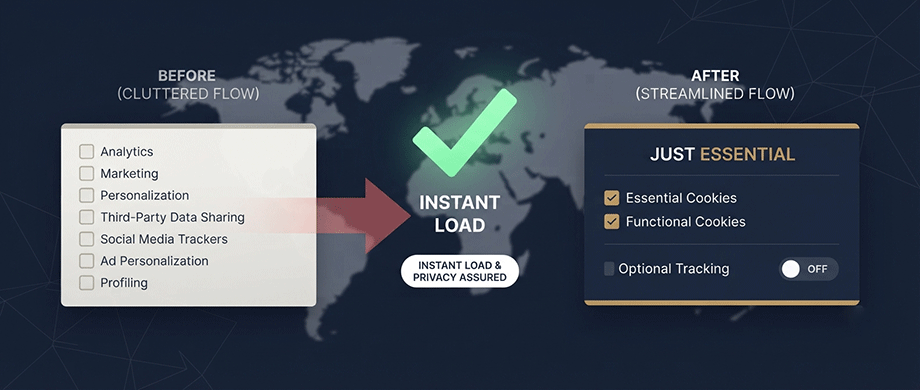
Switching to a self-hosted map simplifies your compliance burden significantly.
- Simplified Cookie Banner: You no longer need to list "Google Maps" as a marketing/tracking vendor in your consent pop-up.
- Cleaner Privacy Policy: You can remove the clause detailing data transfers related to map displays.
- Instant Visibility: The map loads immediately for every visitor. There is no need for a "click-to-unlock" wall, providing a seamless experience while staying fully compliant.
6. A Quick Self-Audit for EU Site Owners

Not sure if your current map is compliant? You can check in 30 seconds:
- Open your website in a private/incognito window.
- Do not click "Accept" on your cookie banner yet.
- Right-click anywhere and select Inspect, then go to the Network tab.
- Type google in the filter box and refresh the page.
- The Verdict: If you see requests to maps.googleapis.com or google.com appearing before you consented, your site is likely non-compliant.
Conclusion: Privacy as a Performance Feature
Switching to self-hosted maps does more than just satisfy a legal checklist; it transforms privacy into a user experience asset. By removing the need for aggressive tracking and clumsy "click-to-load" barriers, you signal respect for your visitors while delivering a faster, smoother page. You no longer have to choose between a beautiful interactive map and a compliant privacy policy—with self-hosting, the most secure option is also the most performant one.
Disclaimer: This article provides general technical information regarding website performance and data privacy. It does not constitute legal advice. Compliance requirements vary by jurisdiction; please consult a qualified legal professional or privacy attorney regarding your specific GDPR obligations.

About the Author
Botrous Kerolos has been designing and building interactive maps for the web since 2009 — from early Flash/SWF maps to modern SVG — and leads development at WP Map Plugins, helping WordPress sites turn static content into fast, accessible, interactive experiences.